
Components
 Last updated 3 months ago
Dropdowns
Contents
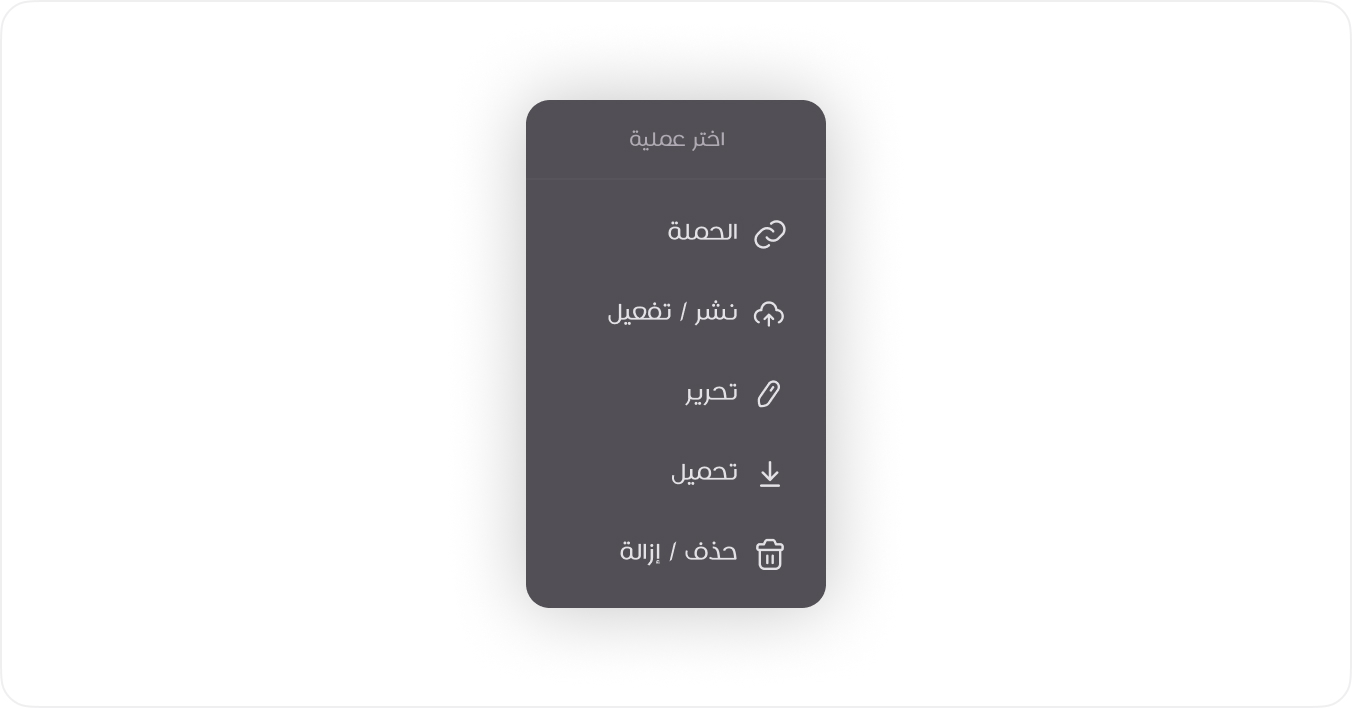
A simple dropdown menu used for selecting actions or options. It typically appears when the user clicks a button or an icon, revealing a list of choices. This type is useful for navigation menus and contextual actions.
Standard
A simple dropdown menu used for selecting actions or options. It typically appears when the user clicks a button or an icon, revealing a list of choices. This type is useful for navigation menus and contextual actions.
View Mode
HTML
<div class="dropdown">
<button class="btn btn-square dropdown-toggle" type="button" data-bs-toggle="dropdown" aria-expanded="false" data-boundary="viewport">
<span class="tticon-dots-horizontal-bold btn-icon"></span>
</button>
<ul class="dropdown-menu dropdown-start">
<li class="dropdown-header">
<span>اختر عملية</span>
</li>
<li>
<a class="dropdown-item" href="#!">
<span class="tticon-eye dropdown-icon"></span>
التفاصيل
</a>
</li>
<li>
<a class="dropdown-item" href="#!">
<span class="tticon-link dropdown-icon"></span>
الخدمة
</a>
</li>
<li>
<a class="dropdown-item" href="#!">
<span class="tticon-pen dropdown-icon"></span>
تحرير
</a>
</li>
<li>
<a class="dropdown-item" href="#!">
<span class="tticon-download dropdown-icon"></span>
تحميل
</a>
</li>
</ul>
</div>
<!-- Usage Example -->
<StandardDropdown header="اختر عملية" :items="standardList" />
<script setup>
import { ref } from 'vue'
const standardList = ref([
  { label: 'التفاصيل', icon: 'tticon-eye', link: '/details' },
  { label: 'الخدمة', icon: 'tticon-link', link: '/service' },
  { label: 'تحرير', icon: 'tticon-pen', link: '/edit' },
  { label: 'تحميل', icon: 'tticon-download', link: '/download' },
])
</script>
<!-- Vue Component Code Block -->
<template>
  <div class="dropdown">
    <button
      class="btn btn-square dropdown-toggle"
      type="button"
      data-bs-toggle="dropdown"
      aria-expanded="false"
      data-boundary="viewport"
    >
      <span class="tticon-dots-horizontal-bold btn-icon"></span>
    </button>

    <ul class="dropdown-menu dropdown-start">
      <li class="dropdown-header" v-if="header">
        <span>{{ header }}</span>
      </li>

      <li v-for="(item, index) in items" :key="index">
        <a
          class="dropdown-item"
          :href="item.link || '#!'"
          @click.prevent="item.onClick && item.onClick()"
        >
          <span :class="[item.icon, 'dropdown-icon']" v-if="item.icon"></span>
          {{ item.label }}
        </a>
      </li>
    </ul>
  </div>
</template>
<script setup>
defineProps({
  items: {
    type: Array,
    default: () => [],
  },
  header: {
    type: String,
    default: '',
  },
})
</script>
Nested Dropdown
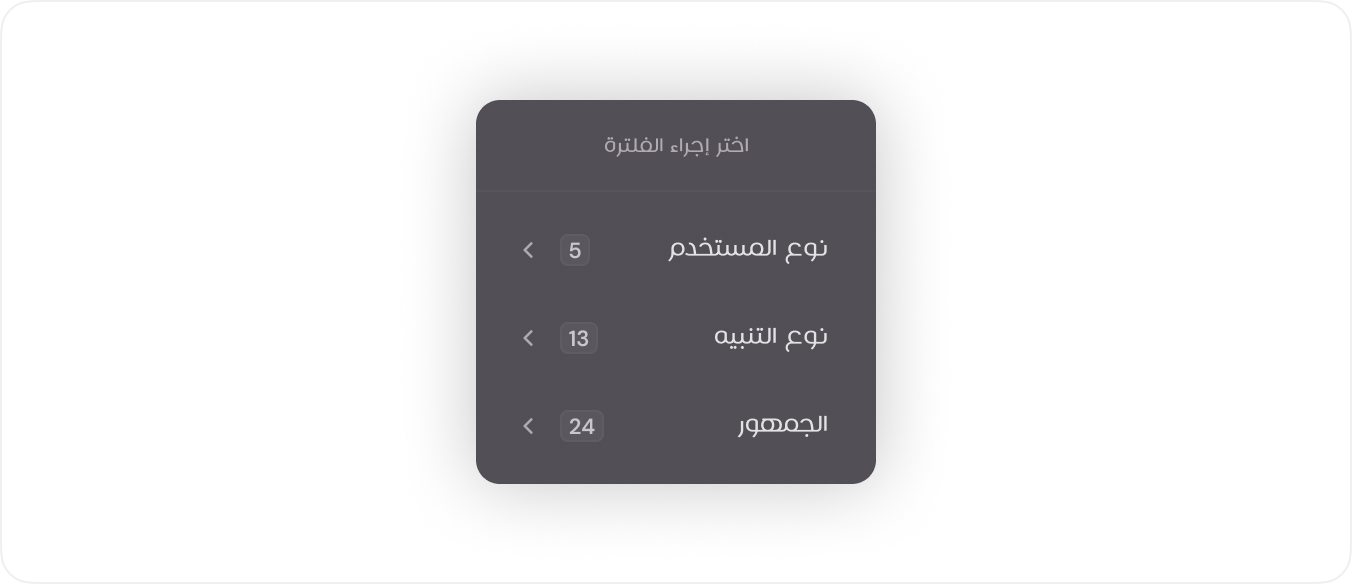
A hierarchical dropdown where selecting an option reveals a secondary dropdown with more specific filters. Examples include Range Price and Select List.
View Mode
HTML
<div class="dropdown">
<button class="btn btn-secondary btn-sm dropdown-toggle" type="button" data-bs-toggle="dropdown" aria-expanded="false">
<span class="tticon-filter-light btn-icon"></span>
<span>فلترة</span>
</button>
<ul class="dropdown-menu dropdown-start">
<li class="dropdown-header">
<span class="dropdown-title">اختر إجراء الفلترة</span>
</li>
<li>
<button class="dropdown-item dropdown-toggle submenu-open" data-bs-toggle="dropdown">
الخدمة
<span class="dropdown-end-area">
<span class="dropdown-number">2</span>
<span class="dropdown-chevron tticon-chevron-left"></span>
</span>
</button>
<ul class="dropdown-menu submenu" style="min-width: 230px">
<li class="dropdown-header">
<button class="submenu-close dropdown-toggle">
<span class="tticon-chevron-right"></span>
رجوع للفلترة
</button>
</li>
<li class="dropdown-search">
<span class="input-group">
<span class="tticon-search input-group-text"></span>
<input class="form-control" type="text" placeholder="بحث في الفلتر.."/>
</span>
</li>
<li class="dropdown-checks">
<span class="form-check dropdown-check-item">
<label class="form-label">
<input class="form-check-input" type="checkbox" value=""/>
خدمة توفير نقاط البيع
</label>
</span>
<span class="form-check dropdown-check-item">
<label class="form-label">
<input class="form-check-input" type="checkbox" value="" checked/>
خدمة صرف العلاج الدوائي
</label>
</span>
</li>
<li class="dropdown-footer">
<button class="btn btn-primary btn-sm">اعتماد</button>
<button class="btn btn-secondary btn-sm">إعادة تعيين</button>
</li>
</ul>
</li>
<li>
<button class="dropdown-item dropdown-toggle submenu-open" data-bs-toggle="dropdown">
الحالة
<span class="dropdown-end-area">
<span class="dropdown-number">1</span>
<span class="dropdown-chevron tticon-chevron-left"></span>
</span>
</button>
<ul class="dropdown-menu submenu" style="min-width: 230px">
<li class="dropdown-header">
<button class="submenu-close dropdown-toggle">
<span class="tticon-chevron-right"></span>
رجوع للفلترة
</button>
</li>
<li class="dropdown-search">
<span class="input-group">
<span class="tticon-search input-group-text"></span>
<input class="form-control" type="text" placeholder="بحث في الفلتر.."/>
</span>
</li>
<li class="dropdown-checks">
<span class="form-check dropdown-check-item">
<label class="form-label">
<input class="form-check-input" type="checkbox" value=""/>
قيد المراجعة
</label>
</span>
<span class="form-check dropdown-check-item">
<label class="form-label">
<input class="form-check-input" type="checkbox" value="" checked/>
قيد التنفيذ
</label>
</span>
<span class="form-check dropdown-check-item">
<label class="form-label">
<input class="form-check-input" type="checkbox" value=""/>
مكتملة
</label>
</span>
<span class="form-check dropdown-check-item">
<label class="form-label">
<input class="form-check-input" type="checkbox" value=""/>
تجربة سريعة
</label>
</span>
</li>
<li class="dropdown-footer">
<button class="btn btn-primary btn-sm">اعتماد</button>
<button class="btn btn-secondary btn-sm">إعادة تعيين</button>
</li>
</ul>
</li>
<li>
<button class="dropdown-item dropdown-toggle submenu-open" data-bs-toggle="dropdown">
النطاق الزمني
<span class="dropdown-end-area">
<span class="dropdown-number d-none">0</span>
<span class="dropdown-chevron tticon-chevron-left"></span>
</span>
</button>
<ul class="dropdown-menu submenu" style="min-width: 230px">
<li class="dropdown-header">
<button class="submenu-close dropdown-toggle">
<span class="tticon-chevron-right"></span>
رجوع للفلترة
</button>
</li>
<li class="js-stop-propagation">
<input class="js-datepicker" type="hidden"/>
</li>
<li class="dropdown-footer">
<button class="btn btn-primary btn-sm">اعتماد</button>
<button class="btn btn-secondary btn-sm">إعادة تعيين</button>
</li>
</ul>
</li>
</ul>
</div>
<!-- Usage Example -->
<NestedDropdown
  label="فلترة"
  label-icon="tticon-filter-light"
  header="اختر عملية"
  :items="nestedList"
  @update="onUpdateFilter"
/>
<script setup>
import { ref } from 'vue'
const nestedList = ref([
  {
    label: 'الخدمة',
    selectedCount: 2,
    type: 'checkboxes',
    options: [
      { label: 'خدمة توفير نقاط البيع', value: 'pos' },
      { label: 'خدمة صرف العلاج الدوائي', value: 'medicine', checked: true },
    ],
  },
  {
    label: 'الحالة',
    selectedCount: 1,
    type: 'checkboxes',
    options: [
      { label: 'قيد المراجعة', value: 'review' },
      { label: 'قيد التنفيذ', value: 'in_progress', checked: true },
      { label: 'مكتملة', value: 'completed' },
      { label: 'تجربة سريعة', value: 'test' },
    ],
  },
  {
    label: 'النطاق الزمني',
    type: 'datepicker',
  },
])
const onUpdateFilter = ({ filter, value, checked }) => {
  console.log(filter, value, checked)
}
</script>
<!-- Vue Component Code Block -->
<template>
  <div class="dropdown">
    <button
      class="btn btn-secondary btn-sm dropdown-toggle"
      type="button"
      data-bs-toggle="dropdown"
      aria-expanded="false"
    >
      <span :class="labelIcon + ' btn-icon'"></span>
      <span>{{ label }}</span>
    </button>

    <ul class="dropdown-menu dropdown-start">
      <li class="dropdown-header" v-if="header">
        <span>{{ header }}</span>
      </li>

      <li v-for="(item, index) in items" :key="index" class="position-static">
        <button
          class="dropdown-item dropdown-toggle submenu-open"
          data-bs-toggle="dropdown"
          aria-expanded="false"
        >
          {{ item.label }}
          <span class="dropdown-end-area">
            <span class="dropdown-number" v-if="item.selectedCount">{{ item.selectedCount }}</span>
            <span class="dropdown-chevron tticon-chevron-left"></span>
          </span>
        </button>

        <ul class="dropdown-menu dropdown-menu-end submenu" style="min-width: 230px">
          <li class="dropdown-header">
            <button class="submenu-close dropdown-toggle" @click="closeFilters($event)">
              <span class="tticon-chevron-right"></span>
              رجوع للفلترة
            </button>
          </li>

          <!-- search bar (optional) -->
          <li v-if="item.type === 'checkboxes'" class="dropdown-search">
            <span class="input-group">
              <span class="tticon-search input-group-text"></span>
              <input class="form-control" type="text" placeholder="بحث في الفلتر.." />
            </span>
          </li>

          <!-- checkboxes -->
          <li v-if="item.type === 'checkboxes'" class="dropdown-checks">
            <span
              v-for="(opt, idx) in item.options"
              :key="idx"
              class="form-check dropdown-check-item"
            >
              <label class="form-label">
                <input
                  class="form-check-input"
                  type="checkbox"
                  :value="opt.value"
                  :checked="opt.checked"
                  @change="
                    $emit('update', {
                      filter: item.label,
                      value: opt.value,
                      checked: $event.target.checked,
                    })
                  "
                />
                {{ opt.label }}
              </label>
            </span>
          </li>

          <!-- datepicker (you can replace with your component) -->
          <li v-if="item.type === 'datepicker'" class="js-stop-propagation">
            <input class="js-datepicker" type="hidden" />
          </li>

          <!-- footer actions -->
          <li class="dropdown-footer">
            <button class="btn btn-primary btn-sm" @click="onUpdate">اعتماد</button>
            <button class="btn btn-secondary btn-sm" @click="onReset">إعادة تعيين</button>
          </li>
        </ul>
      </li>
    </ul>
  </div>
</template>
<script setup>
import { onMounted } from 'vue'
import { Dropdown } from 'bootstrap'

defineProps({
  items: {
    type: Array,
    default: () => [],
  },
  header: {
    type: String,
    default: '',
  },
  label: {
    type: String,
    default: '',
  },
  labelIcon: {
    type: String,
    default: '',
  },
  onUpdate: {
    type: Function,
    default: () => {},
  },
  onReset: {
    type: Function,
    default: () => {},
  },
})

defineEmits(['update'])

onMounted(() => {
  document.querySelectorAll('.dropdown .dropdown-toggle').forEach((el) => {
    el.addEventListener('click', (e) => {
      e.stopPropagation()

      const parent = el.parentElement
      const submenu = parent.querySelector('.dropdown-menu')

      if (submenu) {
        submenu.classList.toggle('show')
      }

      parent.parentElement.querySelectorAll('.dropdown-menu.show').forEach((openMenu) => {
        if (openMenu !== submenu) {
          openMenu.classList.remove('show')
        }
      })
    })
  })

  document.querySelectorAll('.dropdown > .dropdown-toggle').forEach((el) => {
    new Dropdown(el)
  })
})

function closeFilters(event) {
  event.stopPropagation()

  const submenu = event.target.closest('.dropdown-menu.submenu.show')

  if (submenu) {
    submenu.classList.remove('show')

    const parentSubmenuToggle = submenu.parentElement.querySelector(
      '.dropdown-item.dropdown-toggle.submenu-open',
    )
    if (parentSubmenuToggle) {
      parentSubmenuToggle.focus()
    }
  }
}
</script>